

For years, most teams experienced HubSpot in a very structured way.
Contacts lived in tables.
Deals lived in stage-based pipelines.
Boards were visual representations of predefined processes.
That structure was predictable and operationally safe. But it was also rigid. It was not enough.
HubSpot’s New Flexible CRM Views: From Preset Pipelines to a Fully Flexible CRM
Lately, with the introduction of Flexible CRM Views, HubSpot has made one of the most significant structural changes to the CRM experience in recent years. And while it may look like a UI upgrade at first glance, it’s much deeper than that.
This is not just a redesign.
It’s a shift from preset operational views to property-driven visualization. And that changes how businesses think about their data.
The End of Stage-Only Thinking
Historically, a board view in HubSpot meant one thing: pipeline stages. If you wanted a board, you were looking at your process. Full stop.
Now, boards can be grouped by almost any property with defined options — owner, team, deal type, priority, region, lifecycle stage, or even custom properties. The board is no longer tied to stages alone.
This sounds simple, but the implications are big.
Instead of asking, “What stage is this deal in?” you can now ask:
How is workload distributed by owner?
Which region is carrying more volume?
Where are high-priority deals concentrated?
How are renewals segmented by contract type?
How are my sales distributed in the area?
What are my projects/clients per time zone?
The board stops being just a process visualization. It becomes an operational lens.
For businesses, this is a fundamental shift. The CRM is no longer forcing you to see your business through pipeline stages. It allows you to see it through whichever property best reflects reality.
That flexibility is powerful — and it requires intention. Also this changes doesn’t have to be permanent, it could be specific views for specific team members. Isn’t this amazing?
A CRM That Adapts to Questions, Not Just Process
Flexible CRM Views introduce multiple visualization types directly within the object index page: table, board, Gantt, calendar, report view — and even a map view currently being tested in private beta for Enterprise users.
The important part isn’t the number of views. It’s what they enable
Instead of exporting to Excel or building a custom report to answer a simple question, teams can now switch perspectives instantly.
It’s about allowing each team to see the business through the lens that answers their questions — without leaving the CRM.
A sales manager might start in table view to bulk update records, switch to board view grouped by owner to assess workload distribution, move to calendar view to understand closing concentration by month, and finally jump into report view to identify trends in deal creation over time. All of that happens inside the same dataset, without building separate reports.
Now imagine the same flexibility applied to marketing.
A marketing manager could group contacts by lifecycle stage to understand funnel progression, then regroup the board by lead source to evaluate acquisition quality. In report view, they might pivot contacts by campaign or region to detect performance imbalances. In calendar view, they could visualize form submissions or MQL creation over time to identify seasonality or spikes after a campaign launch.
Instead of exporting data to analyze conversion patterns, the analysis begins where the data lives.
Customer Success teams benefit in a different way.
A Customer Success manager might group companies by renewal date, by health score, or by account tier — not by pipeline stage. They could use board view to visualize accounts by risk level, calendar view to see upcoming renewals, and table view with conditional highlighting to quickly detect accounts with unusually long open tickets or declining engagement.
The CRM stops being “sales-only.”
It becomes operational infrastructure.
This is the deeper shift: the CRM is no longer forcing teams to think in terms of predefined pipelines. It adapts to the question being asked.
And when insight lives where execution happens, behavior changes.
Teams don’t wait for a report.
They adjust in real time.
Table View: Small Improvements, Real Impact
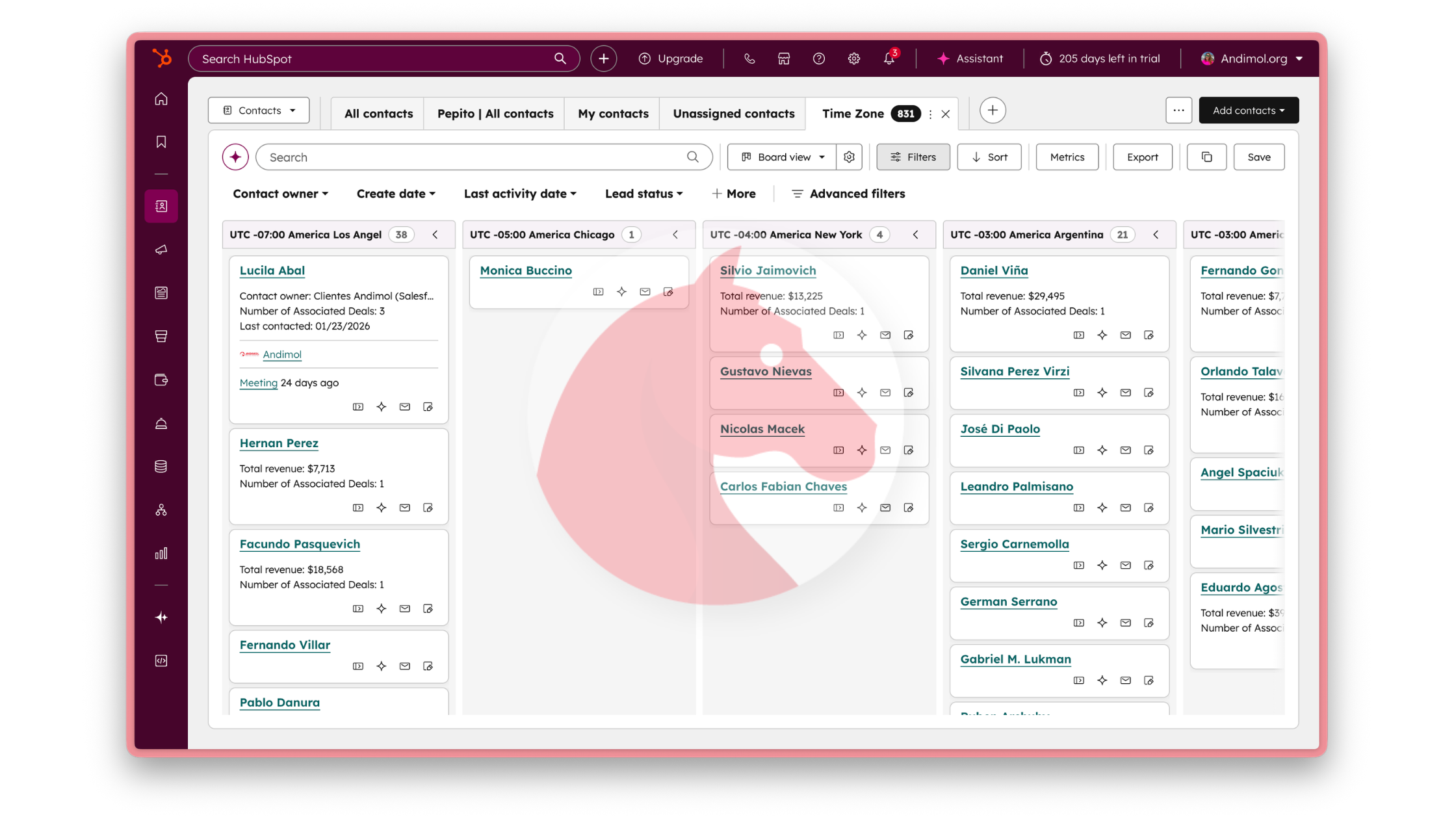 Most teams still live in table view. That hasn’t changed. What has changed is how much more usable it has become.
Record previews now open inline instead of covering the table. Filters can be tucked away when not needed. Columns can be added directly from the header menu instead of navigating into deeper settings. Data density can be adjusted so power users can scan more records at once. Zebra striping improves visual clarity when you need to scan or count quickly.
These may feel like quality-of-life improvements — and they are — but in high-volume environments, small friction reductions compound quickly.
Two additions stand out strategically.
The first is column insights, which runs a quick analysis on a specific property column and highlights imbalances. If too many deals are unassigned, or if one owner has significantly more workload than others, the system surfaces that instantly. For Super Admins, this is a subtle but powerful governance tool.
The second is conditional highlighting, which applies gradient coloring to numeric columns. Outliers become visible immediately. A large deal with low probability. A ticket with unusually long resolution time. You don’t need to scan row by row — the anomaly finds you.
The table stops being passive. It becomes diagnostic.
Report View: Embedded Analysis Without Leaving the CRM
Another meaningful evolution is the introduction of report view inside CRM views. Instead of navigating to dashboards, you can switch the same data into a summarized or chart-based representation. You can pivot counts by owner, visualize trends over time, or detect anomalies in volume patterns.
The design intentionally keeps table view and report view in lockstep. If a property is visible in your table, it becomes available in your report dropdowns. This reduces data mismatches and keeps trust intact.
The result is fewer clicks, fewer exports, and faster insight.
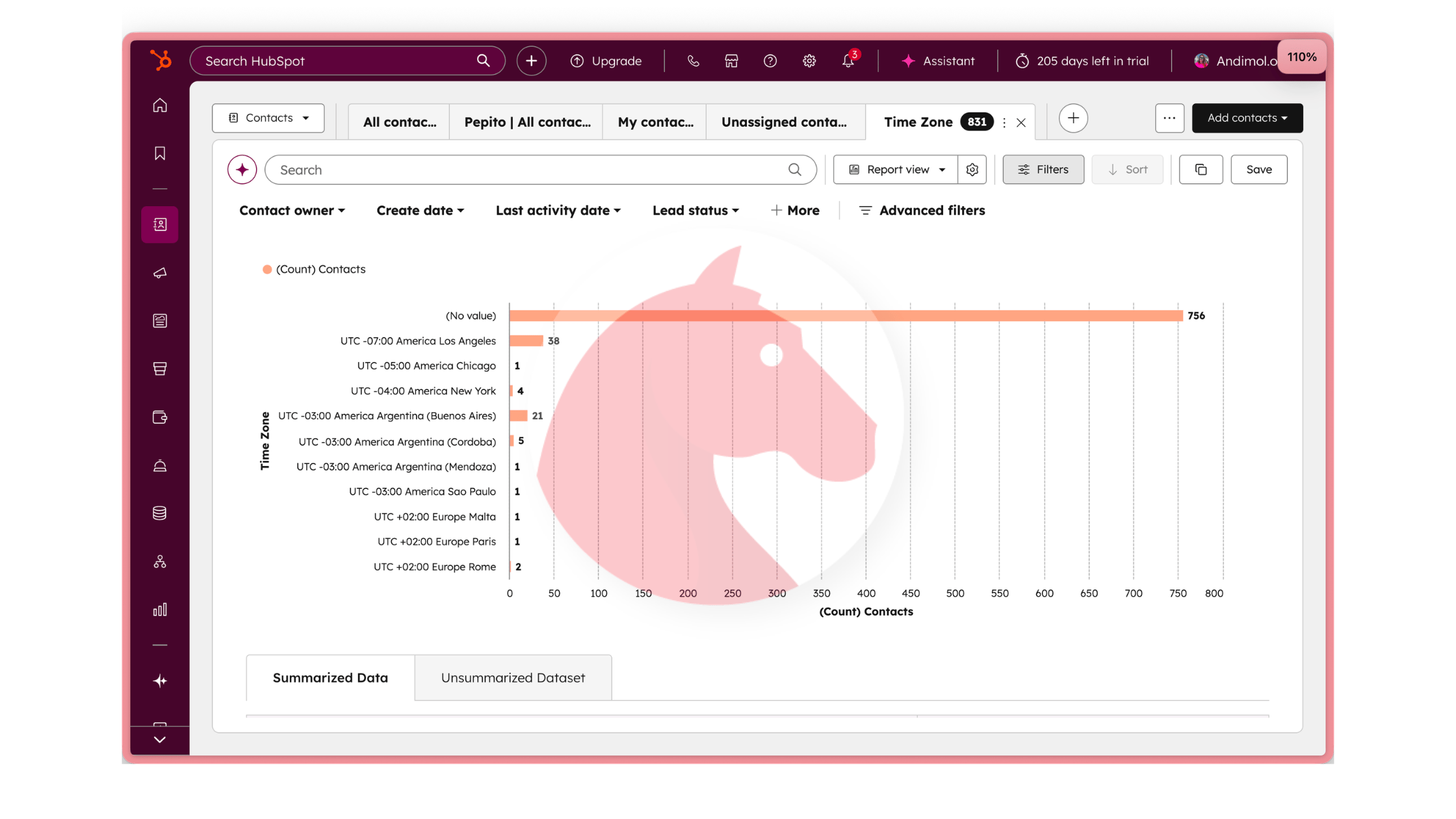
For many businesses, this alone will reduce the dependency on external spreadsheets for daily analysis or even the amount of reports created in the CRM (specially if you are hitting the 1000 custom reports limit).
Calendar and Gantt: Making Time Visible
Calendar view adds another operational layer: time.
You can see work by day, week, or month. But perhaps more importantly, the calendar also highlights records missing date properties. That turns it into a subtle data hygiene mechanism. If deals lack close dates, they become visible in a way that’s hard to ignore.
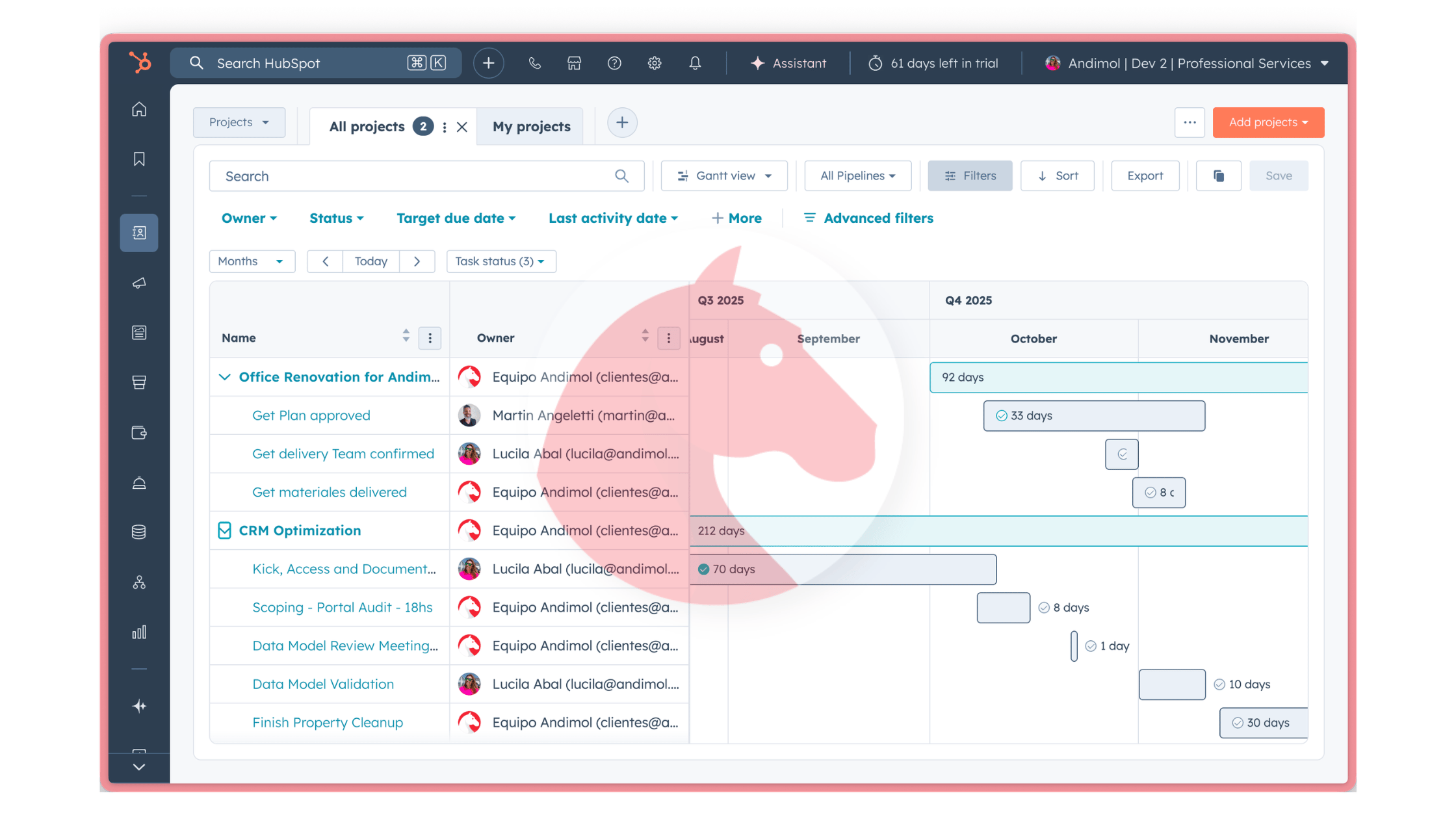
Gantt view extends this timeline thinking further. Available for deals, services, and the newer Projects object, it allows teams to visualize date-based work horizontally, drag and drop to adjust timing, and understand overlap and sequencing.
Again, the shift is conceptual.
The CRM is no longer just showing records. It’s showing movement.
Map View: A Geographic Lens in Private Beta
One of the most anticipated additions is Map View, currently in private beta for Enterprise customers enrolled in Flexible CRM Views.
Map View allows records to be visualized geographically, giving businesses a spatial understanding of their data. Territory distribution, regional deal concentration, service density — these become visible immediately.
At the moment, the beta has limitations, including a cap on the number of records displayed at once, but the roadmap includes expanding those capabilities before broader release.
For companies operating across multiple regions, this view will introduce yet another strategic layer of clarity.
This is especially powerful for real estate businesses that want to understand their prospects, clients, and property volume by area.
Freedom Requires Governance
The biggest change introduced by Flexible CRM Views is not visual. It’s structural freedom.
When boards can be grouped by any property, when views can be customized per user or per team, when analysis is embedded everywhere, the CRM becomes flexible — but also less prescriptive.
That means Super Admins carry more responsibility.
Without alignment, flexible views can multiply confusion. Every team creating its own grouping logic without shared standards leads to fragmentation.
With thoughtful governance, however, the opposite happens. Teams gain contextual clarity. Adoption improves. Data quality becomes easier to monitor. Insight moves closer to action.
Flexible CRM Views increase capability. Maturity determines impact.
The Bigger Picture
HubSpot’s evolution here is subtle but important.
The CRM is moving away from a linear, stage-based mental model and toward a multidimensional, property-driven one. Instead of asking users to conform to the system’s structure, the system adapts to how the business operates.
For organizations that approach this strategically, the opportunity is significant.
The CRM becomes less about “where is this record in the pipeline?”
And more about “what does this data tell us right now?”
That’s a meaningful shift.
And it’s only the beginning.
The possibilities are now limitless—but that also makes it harder for many admins to know where to start. Let’s chat and find the best way to start optimizing your HubSpot usage and how your teams are leveraging it.